
Mooncake Store Deployment & Tunnig Guide#
This guide covers minimal deployment, and operational tuning of Mooncake Store.
Architecture Overview#
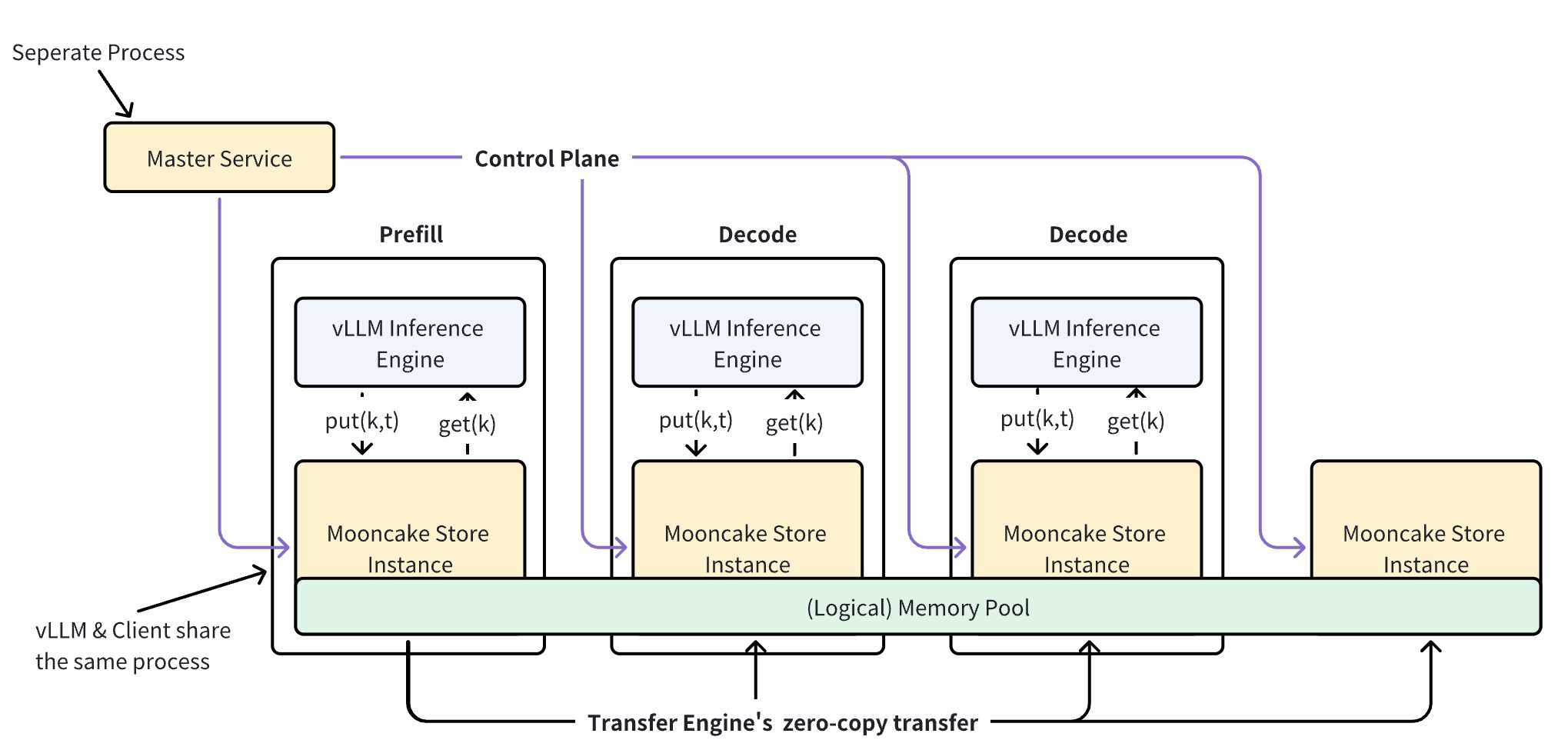
Master Service (mooncake_master): The central coordinator. It manages cluster membership, allocates object storage across client nodes, and enforces eviction/placement policies. Runs as a standalone process.
Client Node: Each node contributes DRAM (and optionally VRAM/SSD) to form the distributed cache pool. Clients communicate with the master over RPC for control operations (Put/Get/Remove), but transfer actual data directly between each other via the Transfer Engine — the master is never in the data path.
Metadata Service: A separate service (etcd, Redis, or HTTP) used by the Transfer Engine for peer discovery and configuration. The master’s embedded HTTP metadata server can replace an external etcd/Redis for simple deployments. We also provide a P2P handshake mechanism (P2PHANDSHAKE) that enables decentralized metadata management by storing metadata locally on each node, eliminating the need for a centralized service — this is the simplest metadata handshake method and the recommended starting point (see Quick Start).
For a detailed design discussion, see the Mooncake Store Design.
Quick Start#
Deploy a minimal single-node Mooncake Store in three steps.
1. Start the Metadata Service#
Choose one option:
# Option A: P2P handshake — the simplest metadata handshake method (recommended)
# Nothing to start here. There is no metadata service to deploy: each node
# exchanges and stores metadata locally during connection setup. Just set the
# client's metadata_server to the literal string "P2PHANDSHAKE" (see step 3).

# Option B: Embed HTTP metadata server in the master
# (configured in step 2 via --enable_http_metadata_server)

# Option C: External etcd
etcd --listen-client-urls http://0.0.0.0:2379 \
     --advertise-client-urls http://localhost:2379
Tip: P2P handshake is the easiest way to get started — it is decentralized and requires no etcd/Redis/HTTP metadata service. Prefer it for development and simple deployments; use an external etcd/Redis for large, long-lived clusters.
2. Start the Master Service#
mooncake_master \
  --enable_http_metadata_server=true \
  --http_metadata_server_host=0.0.0.0 \
  --http_metadata_server_port=8080
On success the log shows:
Starting Mooncake Master Service
Port: 50051
Max threads: 4
Master service listening on 0.0.0.0:50051
The master’s default RPC port is 50051. The HTTP metadata server serves on port 8080 in this example.
3. Start a Store Client#
Use the Python sample program to bring up a client that contributes 3.2 GB of DRAM to the cluster:
# stress_cluster_benchmark.py
import os
from distributed_object_store import DistributedObjectStore

store = DistributedObjectStore()
store.setup(
    local_hostname=os.getenv("LOCAL_HOSTNAME", "localhost"),
    metadata_server=os.getenv("METADATA_ADDR", "http://127.0.0.1:8080/metadata"),
    global_segment_size=3200 * 1024 * 1024,  # DRAM contributed to the cluster
    local_buffer_size=512 * 1024 * 1024,     # Transfer Engine buffer
    protocol=os.getenv("PROTOCOL", "tcp"),
    device_name=os.getenv("DEVICE_NAME", ""),
    master_server_address=os.getenv("MASTER_SERVER", "127.0.0.1:50051"),
)
python3 stress_cluster_benchmark.py
To use P2P handshake instead of an HTTP/etcd metadata service, pass the
literal string P2PHANDSHAKE as metadata_server — no other change is needed:
store.setup(
    local_hostname=os.getenv("LOCAL_HOSTNAME", "localhost"),
    metadata_server="P2PHANDSHAKE",          # decentralized, no metadata service
    global_segment_size=3200 * 1024 * 1024,
    local_buffer_size=512 * 1024 * 1024,
    protocol=os.getenv("PROTOCOL", "tcp"),
    device_name=os.getenv("DEVICE_NAME", ""),
    master_server_address=os.getenv("MASTER_SERVER", "127.0.0.1:50051"),
)
The standalone store service accepts the same value:
python -m mooncake.mooncake_store_service \
  --local_hostname=localhost \
  --metadata_server=P2PHANDSHAKE \
  --master_server=127.0.0.1:50051
What just happened:
The client registered itself with the master via RPC.
The master allocated a 3.2 GB segment on this node and added it to the cluster’s memory pool.
The client is now ready to serve
Put/Get/Removerequests.
You can also deploy a standalone store service process that hosts memory/SSD without an inference application:
python -m mooncake.mooncake_store_service \
  --local_hostname=localhost \
  --metadata_server=http://127.0.0.1:8080/metadata \
  --master_server=127.0.0.1:50051
Verify#
# Health check — master metrics endpoint
curl -s http://localhost:9003/metrics/summary

# List registered clients
# (exposed through the store's Python API or RPC)
Deployment Scenarios#
Single-Node (TCP) — Development / Quick Evaluation#
The simplest deployment, as shown in Quick Start. A single mooncake_master orchestrates clients over TCP. Suitable for development, testing, and single-host evaluation.
mooncake_master \
  --enable_http_metadata_server=true \
  --http_metadata_server_host=0.0.0.0 \
  --http_metadata_server_port=8080
Limitation: the master is a single point of failure. If it crashes, cluster operations pause until it is restored.
High-Availability (etcd) — Production HA#
Runs a cluster of master instances coordinated through etcd. If the leader fails, the remaining instances elect a new leader automatically.
# Start each master instance with:
mooncake_master \
  --enable-ha=true \
  --etcd-endpoints="10.0.0.1:2379;10.0.0.2:2379;10.0.0.3:2379" \
  --rpc-address=10.0.0.1
Each instance must specify its own reachable --rpc-address. The etcd cluster used for HA can be shared with or separate from the Transfer Engine’s metadata etcd.
High-Availability (Redis) — Alternative HA Backend#
Same HA semantics but using Redis instead of etcd for leader election:
mooncake_master \
  --enable-ha=true \
  --ha_backend_type=redis \
  --ha_backend_connstring="redis://127.0.0.1:6379" \
  --rpc-address=10.0.0.1
Snapshot & Restore — Backup / Disaster Recovery#
Caution
Metadata Snapshot And Restore is experimental feature.
Periodically persist master metadata to local disk or S3, enabling recovery from a recent snapshot after a crash.
export MOONCAKE_SNAPSHOT_LOCAL_PATH=/data/mooncake_snapshots

mooncake_master \
  --enable_snapshot=true \
  --snapshot_interval_seconds=300 \
  --snapshot_retention_count=5 \
  --snapshot_object_store_type=local \
  --enable_snapshot_restore=true
Tiered Storage with SSD Offload — Cost-Effective Capacity#
Extends the cache pool from DRAM to SSD while keeping normal reads and writes on the distributed memory path. With --enable_offload=true, completed memory writes are queued for asynchronous SSD persistence through the master control plane. Set --offload_on_evict=true to defer that SSD write until the memory eviction path selects an object for reclamation. When --promotion_on_hit=true, SSD-only objects can be promoted back to DRAM after repeated reads; admission is gated by --promotion_admission_threshold.
mooncake_master \
  --enable_offload=true \
  --offload_on_evict=true \
  --promotion_on_hit=true \
  --promotion_admission_threshold=2 \
  --root_fs_dir=/mnt/ssd_cache \
  --enable_http_metadata_server=true \
  --http_metadata_server_port=8080
CXL-Aware Allocation — Memory Tiering#
When the host has CXL-attached memory, the master can preferentially allocate new objects on the CXL tier, reserving local DRAM for latency-sensitive operations.
mooncake_master \
  --enable_cxl=true \
  --cxl_path=/dev/dax0.0 \
  --cxl_size=17179869184 \
  --allocation_strategy=cxl
Container / Dynamic Network Interface#
When the master runs in a container with a dynamic IP, use --rpc_interface to resolve the RPC address from a stable interface name:
mooncake_master \
  --rpc_interface=eth0 \
  --enable_http_metadata_server=true \
  --http_metadata_server_host=0.0.0.0 \
  --http_metadata_server_port=8080
The master resolves the current IPv4 address of eth0 at startup and uses it as the advertised RPC address.
Metrics Endpoints#
The master exposes Prometheus-style metrics on --metrics_port:
# Prometheus format
curl -s http://<master_host>:9003/metrics

# Human-readable summary
curl -s http://<master_host>:9003/metrics/summary
Quick Tips#
Scale
--rpc_thread_numwith available CPU cores and workload.Start with default eviction settings; adjust
--eviction_high_watermark_ratioand--eviction_ratiobased on memory pressure and object churn.Use
/metrics/summaryduring bring-up; integrate/metricswith Prometheus/Grafana for production.For detailed SSD offload configuration (storage backends, eviction policies, io_uring), see the SSD Offload guide.
For NVMe-oF SSD pool configuration see the NVMe-oF SSD Pool Deployment Guide
For experimental 3FS (USRBIO) integration as a persistent storage backend, see the 3FS USRBIO Plugin guide.
For detailed monitoring and observation see Observability
Reference: Master Startup Flags#
RPC#
Flag |
Default |
Description |
|---|---|---|
|
|
RPC listen port |
|
|
RPC worker threads |
|
|
RPC bind address |
|
empty |
Network interface to resolve RPC address at startup (overrides |
|
|
Idle connection timeout; |
|
|
Enable TCP_NODELAY |
Logging#
The master uses glog. When --log_dir is set, all severities are merged into a single journal file in that directory (mooncake_master.INFO.<date>-<time>.<pid>), reachable through the stable mooncake_master.INFO symlink.
glog’s standard flags (--log_dir, --max_log_size, --logtostderr, …) control the rest.
Metrics#
Flag |
Default |
Description |
|---|---|---|
|
|
Periodically log master metrics |
|
|
HTTP port for |
HTTP Metadata Server (Embedded)#
Flag |
Default |
Description |
|---|---|---|
|
|
Enable embedded HTTP metadata server |
|
|
Metadata bind host |
|
|
Metadata TCP port |
Memory Allocator#
Flag |
Default |
Description |
|---|---|---|
|
|
Memory allocator: |
Allocation Strategy#
Flag |
Default |
Description |
|---|---|---|
|
|
|
PutStart Timeouts#
Flag |
Default |
Description |
|---|---|---|
|
|
Seconds before an uncompleted |
|
|
Seconds before |
Eviction & TTLs#
Flag |
Default |
Description |
|---|---|---|
|
|
Lease TTL for KV objects. Supports |
|
|
Soft pin TTL (30 min) |
|
|
Allow evicting soft-pinned objects |
|
|
Fraction evicted at high watermark |
|
|
Usage ratio triggering eviction |
|
|
Seconds before a silent client is considered disconnected |
High Availability#
Master Node High Availability
Flag |
Default |
Description |
|---|---|---|
|
|
Enable HA mode |
|
|
HA backend: |
|
empty |
HA backend connection string |
|
empty |
etcd endpoints, semicolon separated (when |
|
|
Cluster ID for HA persistence |
Caution
Metadata Snapshot And Restore is experimental feature.
Metadata Snapshot And Restore
Flag |
Default |
Description |
|---|---|---|
|
|
Enable periodic metadata snapshot |
|
|
Interval between snapshots |
|
|
Timeout per snapshot child process |
|
|
Number of recent snapshots retained |
|
required |
Object store: |
|
empty |
Catalog store: |
|
empty |
Catalog store connection string (required for |
|
empty |
Optional local backup directory |
|
|
Restore from latest snapshot at startup |
Environment variable: MOONCAKE_SNAPSHOT_LOCAL_PATH (required when --snapshot_object_store_type=local) — persistent directory for local snapshots.
Warning
The snapshot storage path is a managed directory exclusively controlled by Mooncake. Old snapshots exceeding --snapshot_retention_count are automatically deleted. Use a dedicated directory to avoid data loss.
Task Manager#
Flag |
Default |
Description |
|---|---|---|
|
|
Max finished tasks kept in memory |
|
|
Max queued pending tasks |
|
|
Max simultaneously processing tasks |
|
|
Timeout for pending tasks ( |
|
|
Timeout for processing tasks ( |
|
|
Max retries for failed tasks ( |
Offload / Tiered Storage#
Flags for controlling data movement between DRAM and SSD.
Flag |
Default |
Description |
|---|---|---|
|
|
Enable offload from DRAM to SSD |
|
|
Defer offload to eviction time rather than at |
|
|
Force-evict objects exceeding capacity without offload |
|
|
Promote SSD-resident keys to DRAM on read hit |
|
|
Min CountMinSketch count to allow promotion ( |
|
|
Max in-flight promotion tasks |
|
|
Storage quota in bytes |
|
|
Enable disk eviction |
Start with --enable_offload=true for eager asynchronous SSD persistence after Put completion. Add --offload_on_evict=true when you want SSD writes to happen only when memory pressure selects an object for eviction. Add --promotion_on_hit=true to allow hot SSD-only data to be promoted back to DRAM, and tune --promotion_admission_threshold to control how many observed reads are required before promotion is queued.
CXL Memory#
Flag |
Default |
Description |
|---|---|---|
|
|
Enable CXL memory support |
|
|
DAX device path for CXL memory |
|
|
CXL memory size in bytes |
When --allocation_strategy=cxl is set alongside --enable_cxl=true, the master preferentially allocates new objects on CXL memory.
DFS Storage#
Flag |
Default |
Description |
|---|---|---|
|
empty |
DFS mount directory for multi-layer storage backend |
|
|
Max available space for DFS segments |
Master Configuration File#
In addition to CLI flags, the master accepts JSON/YAML config files:
mooncake_master --config_path=mooncake-store/conf/master.yaml
rpc_interface: "eth0"
rpc_port: 50051
Reference: Client & Engine Tuning (Env Vars)#
Runtime Protocol#
Variable |
Default |
Description |
|---|---|---|
|
|
RPC transport protocol between master and clients: |
|
unset |
Set to any value to enable the TENT (next-gen) transfer engine |
|
unset |
Cluster ID label attached to client metrics |
Topology Discovery#
Variable |
Default |
Description |
|---|---|---|
|
|
Auto-discover NIC/GPU topology. Set |
|
empty |
Comma-separated NIC whitelist (e.g., |
When MC_MS_AUTO_DISC=0, pass rdma_devices (comma-separated) to the Python setup() call.
Transfer Engine Metrics (disabled by default)#
Variable |
Default |
Description |
|---|---|---|
|
|
Set to |
|
|
Seconds between reports |
Client Metrics (enabled by default)#
Variable |
Default |
Description |
|---|---|---|
|
|
Set |
|
|
Reporting interval; |
|
|
Min local port for client connections |
|
|
Max local port for client connections |
Local Hot Cache#
Local hot cache provides a DRAM read cache on top of SSD-resident objects for faster access.
Variable |
Default |
Description |
|---|---|---|
|
unset |
Size of the local hot cache (e.g., |
|
unset |
Block size for hot cache (e.g., |
|
unset |
Set |
|
unset |
Minimum CountMinSketch count before a key is admitted to hot cache |
Local Memory Optimization#
Variable |
Default |
Description |
|---|---|---|
|
|
Set |
|
|
Number of times to retry client registration on failure |
|
unset |
CXL device size (overrides |
MMap Buffer & HugePages#
Variable |
Default |
Description |
|---|---|---|
|
unset |
Set |
|
|
Supported: |
|
unset |
Pre-allocated arena pool size (e.g., |
|
unset |
Set |
yalantinglibs Log Level#
export MC_YLT_LOG_LEVEL=info
Available: trace, debug, info, warn (or warning), error, critical.